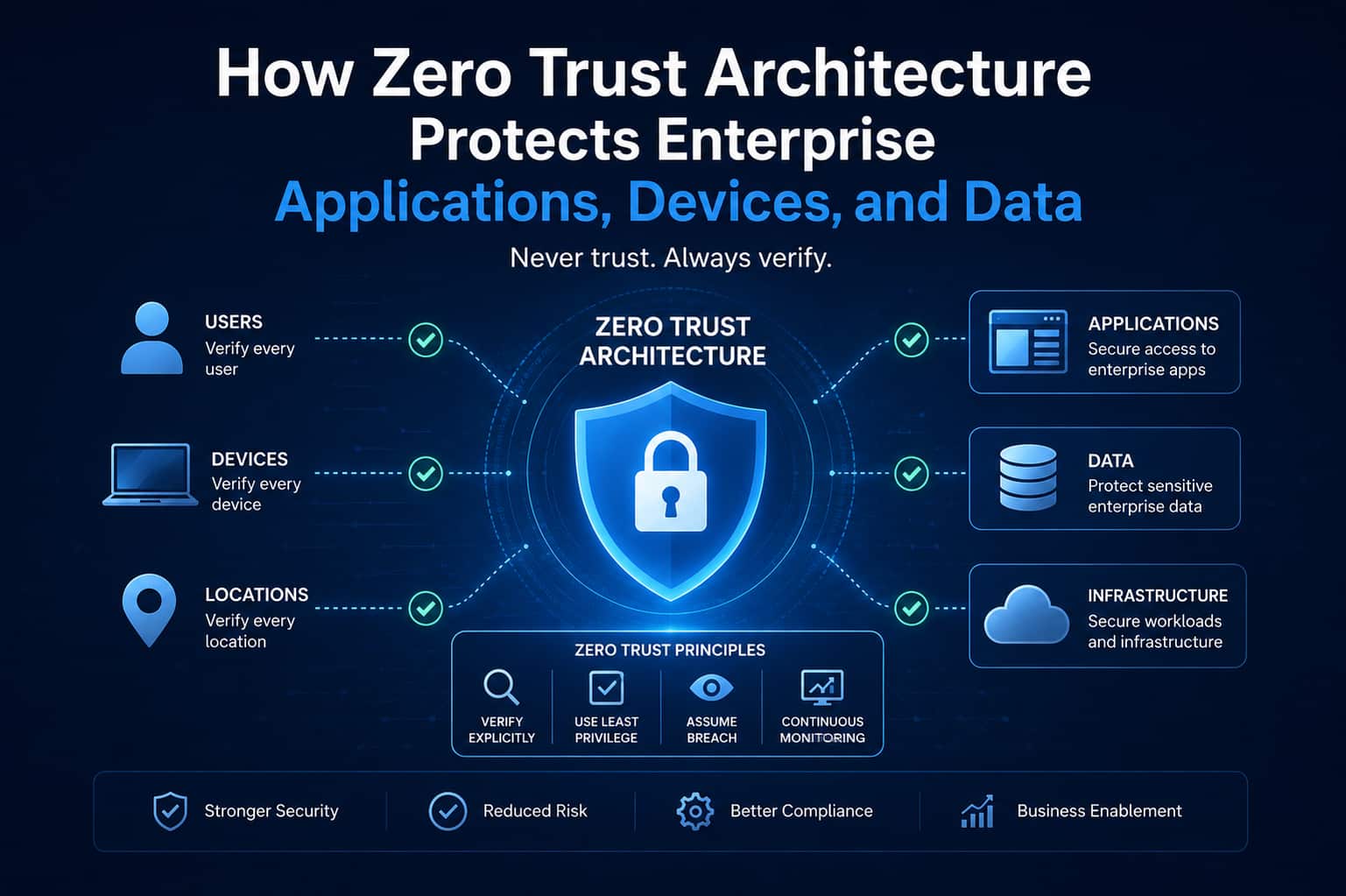
Enterprise IT environments have changed significantly. Applications now run across cloud and hybrid environments, employees work remotely, SaaS platforms are part of daily operations, and business systems increasingly depend on APIs and connected devices. This distributed environment creates a challenge for traditional security models. Simply placing a security boundary around the corporate network is no longer enough when users, applications, devices, and data can exist across multiple environments.
This is where zero trust architecture enterprise strategies can provide a more adaptive approach to security. Rather than automatically trusting users or devices based on network location, Zero Trust requires access to be continuously evaluated according to identity, device posture, context, policy, and the sensitivity of the requested resource.
For enterprises, the objective is not to eliminate trust entirely. It is to make trust explicit, limited, and continuously evaluated.
Why Traditional Perimeter Security Is Becoming Less Effective
Traditional enterprise security often relied heavily on the idea of a trusted internal network and an untrusted external network. That model becomes more difficult to maintain when employees access applications from home, applications are hosted in the cloud, SaaS platforms store business information, and third-party partners require controlled access.
Modern environments may include:
- Remote and hybrid employees
- Cloud applications
- SaaS platforms
- Mobile devices
- APIs and microservices
- Third-party users
- Multiple cloud environments
- Distributed enterprise applications
A compromised credential or device can create unnecessary exposure when access decisions depend primarily on network location. Enterprise Zero Trust security addresses this by moving security decisions closer to the user, device, application, and resource.
Core Principles of Zero Trust Architecture
A Zero Trust strategy is based on several interconnected principles.
Verify Before Granting Access
Users and devices should be authenticated before accessing protected resources. Authentication can incorporate identity, credentials, device information, location, and other relevant contextual signals.
Apply Least Privilege Access
Users should receive only the permissions required for their responsibilities. Least privilege access can reduce unnecessary exposure by limiting what an account can access rather than providing broad permissions by default.
Assume Breach
Zero Trust architecture operates on the assumption that threats may already exist within an environment. This encourages organizations to limit lateral movement, monitor activity, segment resources, and continuously evaluate access rather than relying on a single perimeter defense.
Continuously Evaluate Access
Authentication should not necessarily be treated as a one-time decision. Continuous verification can evaluate changes in user behavior, device posture, application context, and security conditions throughout a session or access lifecycle.
How Zero Trust Protects Enterprise Applications
Enterprise applications increasingly operate across cloud platforms, data centers, SaaS environments, and distributed architectures. Zero Trust can protect these applications by controlling which users, devices, workloads, and services can access specific resources. Identity and access policies can be applied according to business roles and application requirements. APIs can also be protected through authentication, authorization, rate controls, and monitoring. For example, an employee may have permission to access a business application but not its administrative functions. A service account may be allowed to communicate with one API but not access unrelated systems. This approach creates more granular application-level controls.
Protecting Cloud and SaaS Applications
Cloud adoption increases the number of services that need to be secured. Zero Trust can support cloud security by combining identity controls, authentication, authorization, monitoring, and policy enforcement across cloud applications. Rather than assuming that access is safe because a user is connected through a corporate network, policies can evaluate the user's identity, device, application, and access request.
How Zero Trust Protects Enterprise Devices
Endpoints can include corporate laptops, mobile devices, servers, virtual machines, and other connected systems. Endpoint security becomes particularly important when employees access enterprise applications from different locations and networks. A Zero Trust architecture can incorporate device posture into access decisions. For example, organizations may require devices to meet defined security conditions before allowing access to sensitive resources. Factors can include:
- Device identity
- Security configuration
- Patch status
- Encryption
- Endpoint protection
- Operating system status
- Device management status
A user with valid credentials may still receive restricted access if the device does not satisfy the organization's security policy.
How Zero Trust Protects Enterprise Data
Data protection is another important component of enterprise Zero Trust security. Organizations can apply access policies based on data sensitivity, user identity, application context, and business requirements. Sensitive information may require stronger authentication, restricted access, additional monitoring, or specific network controls. Network segmentation can also help isolate critical systems and reduce unnecessary communication between workloads. For example, highly sensitive databases can be separated from general corporate systems, with access permitted only through approved applications or services. This approach can help limit the potential impact of compromised accounts or systems.
Key Components of an Enterprise Zero Trust Architecture
Identity and Access Management
Identity and access management establishes who users and services are and what they are permitted to access.
Multi-Factor Authentication
Multi-factor authentication (MFA) adds additional verification beyond passwords and can strengthen identity security.
Device Security
Endpoint controls help determine whether devices meet organizational security requirements before access is granted.
Network Segmentation
Segmentation can restrict communication between systems and reduce unnecessary lateral movement.
Continuous Monitoring
Security teams need visibility into authentication attempts, access requests, endpoint activity, network traffic, and application behavior.
Policy Enforcement
Centralized and context-aware policies can determine what access should be permitted, restricted, or denied.
Threat Detection
Security analytics and threat detection capabilities can identify suspicious behavior and provide signals for investigation or automated response.
How Enterprises Can Begin Implementing Zero Trust
Zero Trust does not need to be implemented across the entire organization at once. A phased strategy can make adoption more manageable.
1. Identify Critical Assets
Begin by identifying sensitive applications, systems, users, devices, and data.
2. Assess Existing Access
Review who currently has access to critical resources and identify excessive or unnecessary permissions.
3. Strengthen Identity Controls
Implement or improve MFA, identity governance, privileged access management, and authentication policies.
4. Improve Device Visibility
Establish appropriate endpoint management and device security controls.
5. Segment Critical Resources
Prioritize network and workload segmentation around sensitive applications and systems.
6. Introduce Continuous Monitoring
Centralize relevant security signals and establish processes for detecting unusual activity.
7. Expand Gradually
Use lessons from initial implementations to extend Zero Trust policies to additional applications, users, devices, and workloads.
Common Zero Trust Implementation Challenges
Enterprises may encounter several practical challenges during implementation. Legacy applications may not support modern authentication methods. Identity information can be fragmented across multiple systems. Security tools may operate in separate silos, while existing permissions can be difficult to review. Organizations may also face operational concerns if access policies are introduced without sufficient testing. For this reason, successful Zero Trust implementation requires collaboration between security, infrastructure, application, identity, and business teams.
Zero Trust Best Practices for Enterprises
Organizations should consider several practices when developing their strategy:
- Start with clearly defined business and security objectives
- Prioritize critical applications and sensitive data
- Apply least-privilege access
- Strengthen authentication with MFA
- Maintain accurate asset and identity inventories
- Segment critical systems
- Monitor access continuously
- Test policies before broad deployment
- Establish clear exception and escalation processes
- Review access policies regularly
Zero Trust should be treated as an ongoing security strategy rather than a one-time technology deployment.
FAQs
1. What is zero trust architecture for an enterprise?
Zero trust architecture enterprise refers to a security approach that continuously evaluates access based on identity, device, resource, context, and policy rather than automatically trusting users or systems because they are inside a corporate network.
2. How does Zero Trust protect enterprise applications?
It uses identity verification, authorization, least-privilege access, application-level policies, monitoring, and other controls to restrict access to approved users, devices, and services.
3. Is Zero Trust only for cloud environments?
No. Zero Trust can be applied across on-premises infrastructure, private and public clouds, SaaS applications, remote environments, endpoints, APIs, and hybrid architectures.
4. What role does MFA play in Zero Trust?
MFA provides an additional authentication layer and can help organizations strengthen identity verification before granting access to protected resources.
5. How should an enterprise start a Zero Trust program?
A practical starting point is to identify critical assets, map identities and access, strengthen authentication, assess device security, prioritize sensitive resources, and implement controls through a phased roadmap.
Build a Stronger Enterprise Security Architecture
Modern enterprise environments require security strategies that can operate across users, applications, devices, networks, and data regardless of where those resources are hosted. DashMindsIQ helps organizations adopt zero trust architecture enterprise strategies that move beyond broad implicit trust toward granular, policy-driven access and continuous security evaluation.
The most effective implementations are business-focused and phased, combining identity and access management, endpoint security, network segmentation, monitoring, authentication, and threat detection rather than relying on a single security product.
Looking to strengthen your enterprise security strategy? Talk to DashMindsIQ about Zero Trust architecture, cybersecurity modernization, identity management, infrastructure security, and phased enterprise security transformation.